# How to bypass DataDome in Selenium, Playwright and Puppeteer
> Why Selenium, Playwright and Puppeteer get a DataDome 403 and a captcha, what DataDome flags in automated browsers, and how to clear the interstitial, the captcha and tags.js without patching the browser.
- Author: glizzykingdreko
- Published: 2026-11-23
- Tags: datadome, selenium, playwright, puppeteer, chrome-extension, captcha, bypass, antibot, takionapi
- URL: https://takionapi.tech/blog/how-to-bypass-datadome-selenium-playwright
---
To bypass DataDome in Selenium, Playwright or Puppeteer, don't patch the browser. Load the **DataDome Solver** Chrome extension into the browser your script drives and save a Takion API key once. When a page answers with DataDome's 403, the extension clears the interstitial or the slider captcha from DataDome's own frame, the `datadome` cookie is set and the tab reloads into the site.
That's the short answer. Let's walk through what DataDome sees in an automated browser, why stealth patches don't fix it, and the two ways that do.
- [Add to Chrome](https://chromewebstore.google.com/detail/datadome-solver-by-takion/nplaagplnkgpehflgghhhdmkjildpfnp)
- [Check the source](https://github.com/glizzykingdreko/datadome-chrome-extension-solver)
- [See the DataDome bypass API](https://takionapi.tech/bypass/datadome)
## What a DataDome block looks like in a script
You open a page on a site that runs DataDome, like idealista, Foot Locker, Leboncoin or TripAdvisor, and instead of the content you get a **403**. The body loads DataDome's challenge in an iframe from `geo.captcha-delivery.com`.
There are two kinds of challenge behind that frame:
| Challenge | What you see |
| --- | --- |
| Interstitial | a "device check" page that runs for a moment, and can escalate into a captcha |
| Captcha | the slider puzzle |
Once a challenge is solved, the `datadome` cookie is set on the site and the tab reloads into the real content. That cookie is the signal to watch for in your script.
There's a third check you don't see at all. On normal pages DataDome runs **tags.js**, served from each site's own subdomain (like `dd.thetrainline.com`). It posts twice to `/js/`: a `ch` on page load, and an `le` after you've been active. Each answer refreshes the `datadome` cookie.
## What DataDome flags in an automated browser
Selenium, Playwright and Puppeteer drive a real Chrome, but they leave marks DataDome reads:
- the **CDP** connection the framework talks over
- `navigator.webdriver` and the other automation flags
- mouse movement and interaction that doesn't look human
- fingerprints that don't add up
The `le` post from tags.js is aimed at the third one. It's there to catch strange movement and interaction while you navigate, so a Selenium script that fills a form and clicks through the site is exactly what it's looking for. If you want the full picture of the scoring, I wrote it up in [how DataDome actually detects bots](https://takionapi.tech/blog/how-datadome-detects-bots).
## Why patching the browser doesn't fix it
The usual reflex is to harden the browser: a stealth plugin, `undetected-chromedriver`, better proxies, a different TLS stack. Each one fixes one mark and leaves the rest, and DataDome keeps scoring the browser that's left.
The extension takes the other road. It doesn't try to make your browser look human. It answers DataDome's challenges with a clean payload generated by TakionAPI, so CDP, webdriver flags and scripted movements stop being what DataDome scores.
## The methods compared
| Method | Clears the interstitial and captcha | Handles tags.js | Needs a browser | Upkeep |
| --- | --- | --- | --- | --- |
| Stealth plugins / undetected-chromedriver | Not reliably, the browser is still scored | No | Yes | Every Chrome and DataDome update |
| Solving the captcha by hand | Yes, for a person | No | Yes | It doesn't scale |
| Takion DataDome Solver extension | Yes, from DataDome's own frame | Yes | Yes | We follow DataDome's changes |
| Takion API (`datadome.takionapi.tech`) | Yes, you replay the cookie | Yes | No | We follow DataDome's changes |
| Reversing DataDome yourself | Yes, if you keep up | Yes, if you keep up | No | Every script rotation |
If you already drive a browser, use the extension. If you're on plain HTTP requests, use the API.
## Option 1: the DataDome Solver extension
A Chrome extension that solves DataDome interstitials, captchas and tags.js (`ch` and `le`) through TakionAPI, in the browser you already use. Nothing to patch in Selenium, Playwright or Puppeteer.
### Installation
**From the Chrome Web Store.** The quickest way: install it from the [Chrome Web Store](https://chromewebstore.google.com/detail/datadome-solver-by-takion/nplaagplnkgpehflgghhhdmkjildpfnp), pin the icon to the toolbar, click it and paste your TakionAPI key. No key yet? Hit **Get a free key** in the popup, the [trial](https://takionapi.tech/trial) gives you one.
**From source.** Clone the repo and load it unpacked:
```bash
git clone https://github.com/glizzykingdreko/datadome-chrome-extension-solver.git
```
Then open `chrome://extensions`, turn on **Developer mode**, click **Load unpacked** and pick the `extension` folder. Click the extension icon and paste your key.
### What you'll see
 While it works you see the DataDome page get taken over: a dithered Takion surface sweeps over it, one step for every real step of the solve, and reloads into the site once it's done. If the API can't solve it (no key, an invalid key, a plan out of requests) the surface turns red with the reason, then slides back and leaves you the DataDome page. `Esc` cancels at any time.
### How it works
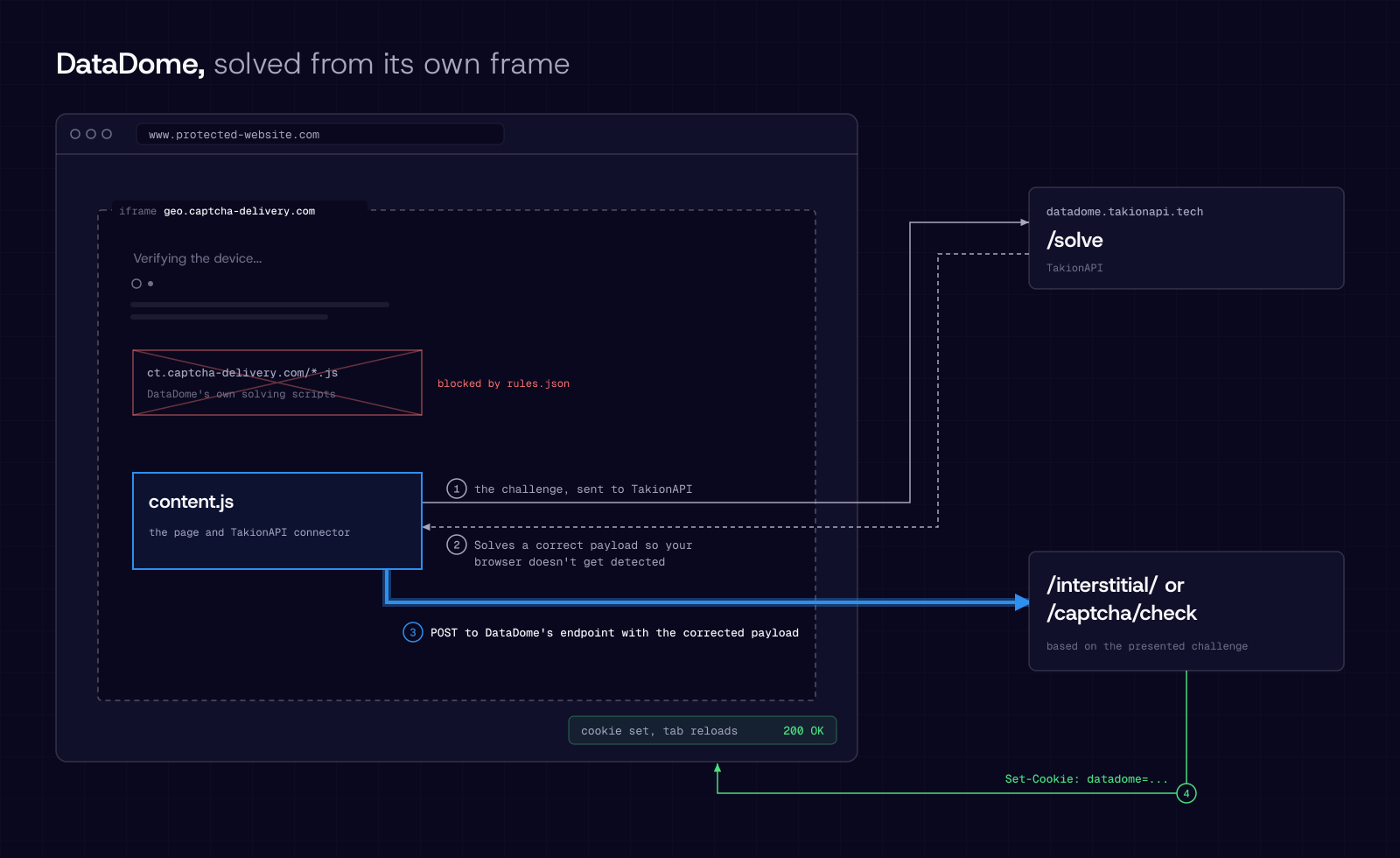 Step by step, when a page answers with DataDome's 403:
1. A network rule blocks every script the challenge frame loads from `ct.captcha-delivery.com`, so the page never tries to solve it on its own.
2. A content script runs inside the `geo.captcha-delivery.com` frame and sends the challenge HTML and URL to `datadome.takionapi.tech/solve`, together with the browser's Chrome version, OS and timezone.
3. The answer is rebuilt from the challenge page itself, in DataDome's own field order. Only the encrypted fields come from the API: `payload` and `plv3` on the interstitial, `ddCaptchaEncodedPayload` and `plv3` on the captcha.
4. The frame posts to `/interstitial/` or calls `/captcha/check`. If the interstitial turns into a captcha, the frame loads it and step 2 runs again.
5. The `datadome` cookie from the response is set on the site and the tab reloads.
The solution is sent from DataDome's own frame.
### tags.js
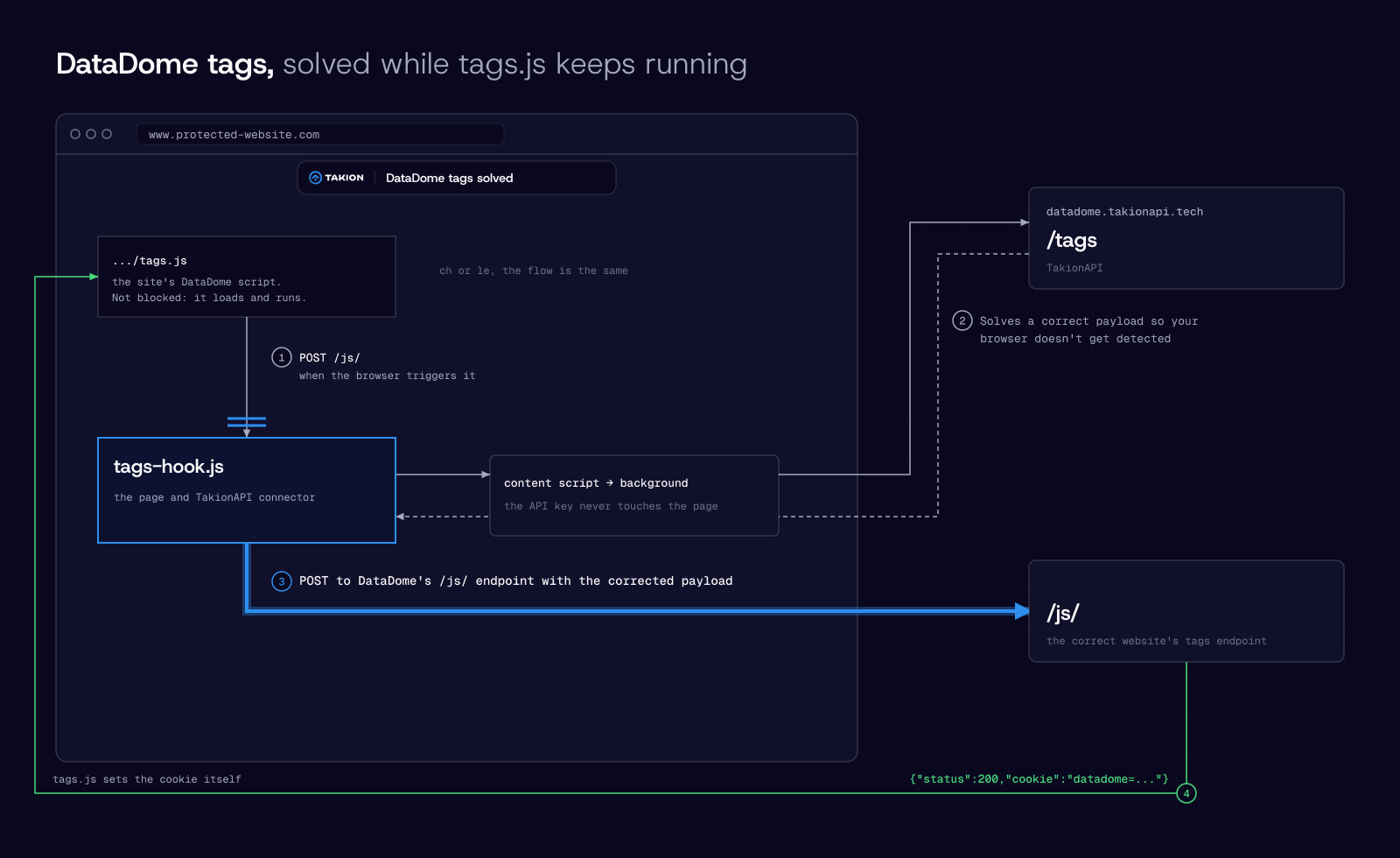 DataDome also runs a tags script on normal pages, served from each site's own subdomain (like `dd.thetrainline.com`). It posts twice to `/js/`: a `ch` on page load and an `le` after you've been active, and each answer refreshes the `datadome` cookie. The `le` one is there for strange movement and interaction while you navigate, so a Selenium script that submits a form and clicks through the site is exactly its target.
The extension lets `tags.js` load and run as usual. A small hook in the page holds its two posts to `/js/`, gets fresh encrypted fields from `datadome.takionapi.tech/tags` and swaps in only `jspl` (plus `eventCounters` on `le`). `cid`, `ddk`, `Referer`, `request` and the rest stay the page's own, and `tags.js` reads the answer and sets the refreshed cookie itself. A small notice at the top of the page tells you it happened.
### Configuration
The key and the on/off switch live in the popup, the defaults in `extension/config.js`.
| Setting | Default | What it does |
| --- | --- | --- |
| `apiKey` | empty | Your TakionAPI key |
| `apiBase` | `https://datadome.takionapi.tech` | Solver API base URL |
| `enabled` | `true` | Turns solving and the script blocking on or off |
| `MAX_SOLVES` / `RATE_WINDOW_MS` | `4` per `60s` | Max solves per tab, so a bad key can't loop forever |
The popup also shows how many challenges it solved.
### Using it from Selenium
Chrome 137+ ignores `--load-extension`, so you install the extension over WebDriver BiDi and write the key straight into `chrome.storage`:
```python
options = webdriver.ChromeOptions()
options.enable_bidi = True
options.add_argument("--enable-unsafe-extension-debugging")
options.add_argument("--remote-debugging-pipe")
driver = webdriver.Chrome(options=options)
extension_id = driver.webextension.install(path="extension")["extension"]
driver.get(f"chrome-extension://{extension_id}/popup/popup.html")
driver.execute_async_script(
"chrome.storage.local.set({apiKey: arguments[0]}).then(arguments[1]);",
API_KEY,
)
driver.get("https://www.idealista.com/")
```
After that, just browse. Challenges get solved and the tab reloads by itself. On 2026-10-13, plain Selenium Chrome got blocked on idealista.com and tickets.rolandgarros.com, and with the extension loaded both cleared the interstitial and the captcha and loaded through in about 6 seconds.
Playwright and Puppeteer load it into their own Chromium the same way they load any unpacked extension.
- [Add to Chrome](https://chromewebstore.google.com/detail/datadome-solver-by-takion/nplaagplnkgpehflgghhhdmkjildpfnp)
- [Check the source](https://github.com/glizzykingdreko/datadome-chrome-extension-solver)
## Option 2: plain HTTP requests
No browser at all. You send the DataDome challenge to the API and replay the `datadome` cookie it returns, under the same proxy, User-Agent and headers it was generated against:
```bash
curl -X POST https://datadome.takionapi.tech/generate \
-H "Authorization: Bearer $TAKION_KEY" \
-H "Content-Type: application/json" \
-d '{
"html": "",
"proxy": "",
"referer": ""
}'
```
The response carries the `datadome` cookie plus the user-agent and headers it was generated against. Keep the IP, the TLS and the headers consistent with them. [How to bypass DataDome, every method compared](https://takionapi.tech/blog/how-to-bypass-datadome) goes deep on this route, and the [DataDome bypass page](https://takionapi.tech/bypass/datadome) has the full request.
- [See the DataDome bypass API](https://takionapi.tech/bypass/datadome)
## Let your agent start from here
If an AI agent drives your browser, through browser-use, Playwright MCP or anything else, and it keeps hitting DataDome's 403, don't let it fight the captcha. Load the DataDome Solver into the browser it drives, save the key once, and the agent just keeps navigating.
## Limits worth knowing
- The extension solves at most 4 challenges per tab every 60 seconds, so a bad key can't loop forever.
- It solves challenges, it doesn't rotate your fingerprint or your IP. A flagged proxy still gets blocked.
- The `datadome` cookie belongs to the session that earned it. Reuse it from another IP and you're back to a 403.
- DataDome updates its scripts often. That's our problem to follow, not yours.
### How do I bypass DataDome in Selenium?
Install the DataDome Solver extension into the Chrome that Selenium drives, over WebDriver BiDi on Chrome 137+, and save your Takion API key in it once. When a page answers with DataDome's 403, the extension clears the interstitial or the captcha from DataDome's own frame, the datadome cookie is set and the tab reloads into the site.
### Why does DataDome block Selenium, Playwright and Puppeteer?
DataDome reads the marks automation leaves: the CDP connection, navigator.webdriver, mouse movement that doesn't look human and fingerprints that don't add up. Its tags.js check is aimed at the interaction a script makes while it navigates.
### Does undetected-chromedriver or a stealth plugin bypass DataDome?
Not reliably. They fix one mark at a time and DataDome keeps scoring the browser that's left. The extension answers DataDome's challenges with a clean payload from TakionAPI instead of trying to make the browser look human.
### Does the extension solve the DataDome slider captcha?
Yes. It solves the interstitial and the slider captcha, and when an interstitial escalates into a captcha it solves that too, then reloads the tab once the datadome cookie is set.
### What about DataDome's tags.js?
The extension lets tags.js run, holds its ch and le posts, swaps in fresh encrypted fields from TakionAPI and lets tags.js set the refreshed datadome cookie itself.
### Can I bypass DataDome without a browser?
Yes. Send the challenge HTML, your proxy and the target page to the Takion API, then replay the datadome cookie it returns with the same IP, User-Agent and headers.
## Conclusion
DataDome in an automated browser is a nice case study in fixing the right layer. Every stealth patch hardens the browser, and the browser is the thing DataDome scores. Answer the challenge cleanly from its own frame and the page just loads.
## Need help with antibots?
[TakionAPI](https://takionapi.tech) clears DataDome in the browser or over plain requests, and the same key covers Akamai, PerimeterX, Incapsula, Cloudflare, Castle and the rest, one call per solve. [Start a free trial](https://takionapi.tech/trial) or [talk to us](https://takionapi.tech/contact) about your target.
## Connect with me
- [GitHub](https://github.com/glizzykingdreko)
- [Twitter](https://mobile.twitter.com/glizzykingdreko)
- [Medium](https://medium.com/@glizzykingdreko)
- [Email](mailto:glizzykingdreko@protonmail.com)
- [TakionAPI](https://takionapi.tech)
- [Buy me a coffee ❤️](https://www.buymeacoffee.com/glizzykingdreko)
## Sources
- [datadome-chrome-extension-solver](https://github.com/glizzykingdreko/datadome-chrome-extension-solver), the extension
- [DataDome Solver by TakionAPI](https://chromewebstore.google.com/detail/datadome-solver-by-takion/nplaagplnkgpehflgghhhdmkjildpfnp), on the Chrome Web Store
- [How DataDome actually detects bots](https://takionapi.tech/blog/how-datadome-detects-bots), the scoring
- [How to bypass DataDome, every method compared](https://takionapi.tech/blog/how-to-bypass-datadome), the request-level route
- [DataDome plv3: reverse engineering the VM behind the token](https://takionapi.tech/blog/datadome-plv3-vm-disassembler), the deep dive